How CareBridge Copilot Works
From an everyday question to a clear next step, in three simple steps. No appointment needed.
Tell CareBridge what is happening.
Use everyday language or voice-to-text. You do not need technical terminology, a diagnosis, or a perfectly written prompt.
Explore practical strategies.
CareBridge helps organize the moment into what may be happening, language you can adapt, and practical next steps.
Use the support that fits the moment.
Ask follow-up questions, practice through role-play, or use a relevant resource available inside CareBridge.

Example of how guidance may be organized
A look inside CareBridge Copilot
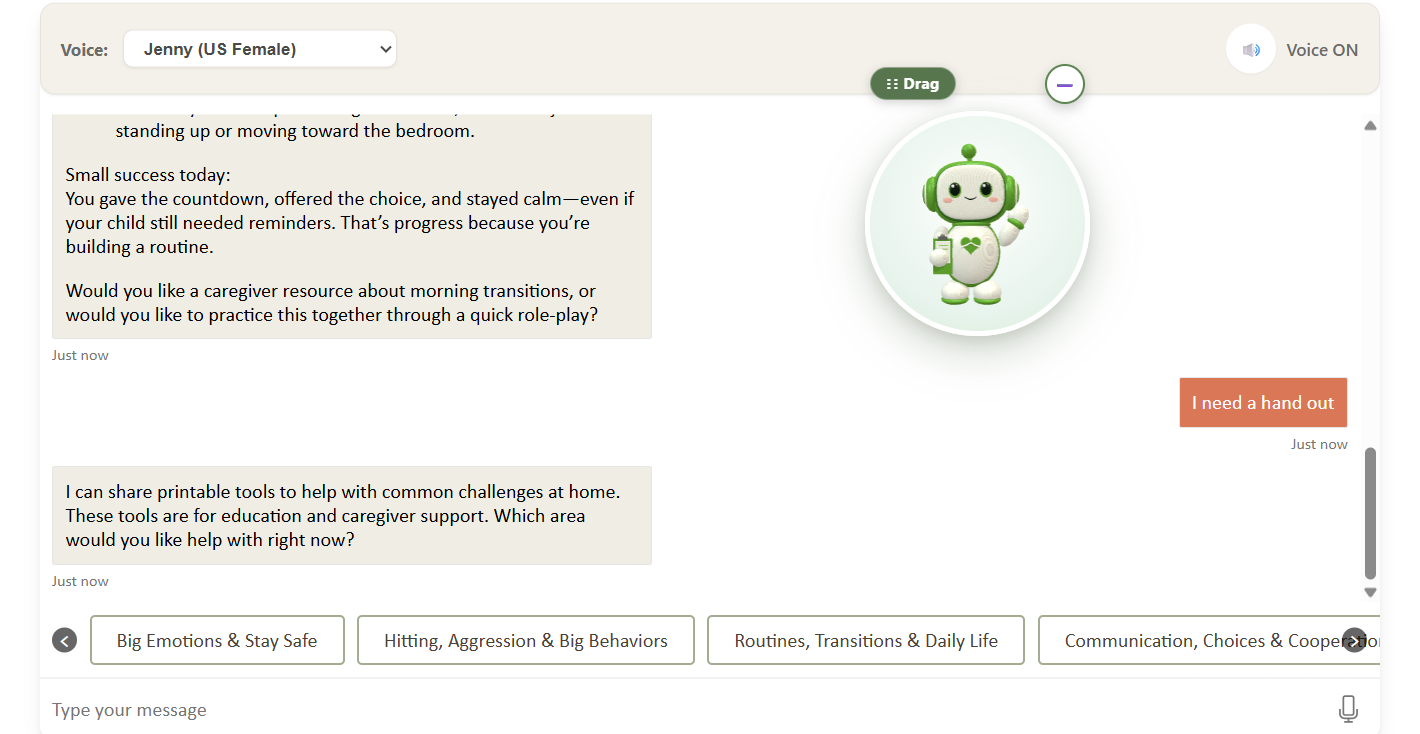
Example family interface. Sample account.
CareBridge Copilot™ proprietary demonstration. © 2026 Sunderlin Behavioral Interventions, Inc. and/or its licensors. No reproduction or redistribution without written permission.
A difficult transition
What may be happening
The change in activity may feel sudden, especially when a child is focused on something they enjoy. Transitions can be harder when they arrive without warning.
What you could say
"I can see this is hard. We are going to finish in two minutes, and then we will move to the next thing together."
Practical next steps
Give a calm, clear two-minute warning. Stay close, acknowledge the difficulty, and follow through gently and consistently when the time comes.
A reminder to adapt
This is one example. You know the individual best, so adjust the wording and the timing to fit the person, the situation, and your relationship.
This is an example of how guidance may be organized, not guaranteed advice. CareBridge Copilot provides educational guidance only.
Start Here: Welcome to CareBridge Copilot
Watch this short orientation to learn what CareBridge Copilot is, who it supports, how to begin, and how to save it to your phone for easier access during real-life moments.
A short orientation to CareBridge Copilot.
CareBridge Copilot™ proprietary demonstration. © 2026 Sunderlin Behavioral Interventions, Inc. and/or its licensors. No reproduction or redistribution without written permission.
The CareBridge Response Structure
What may be happening
A plain-language explanation of what might be contributing to the moment.
What to say
Short, practical language you can adapt for the moment.
What to do next
Clear, practical next steps to consider.
Planning ahead
Ideas to help you prepare for similar situations in the future.
Follow-through ideas
Ways to stay consistent after the moment passes.
Speak your question
Use voice-to-text on compatible devices instead of typing.
Adjust your view
Reposition or minimize the animated avatar to suit your screen.
Role-Play Practice
Practice your language and responses in a safe, guided format. Role-play lets you rehearse what to say and how to respond before you are in a real-life situation.
Printable Resources
Access and print visual supports, checklists, schedules, sample language, and other educational resources directly from CareBridge. Use them at home, in the classroom, in the community, or wherever support is needed.
Short Educational Videos
Short, plain-language educational videos created by the Sunderlin Behavioral team and available inside CareBridge Copilot.