Support for the people who support them.
Practical, on-demand learning and support for families, educators, and support teams supporting children, teens, and young adults ages 2 to 21 with developmental disabilities, neurodivergence, and other support needs.
Explore practical strategies for communication, routines, transitions, behavior, emotional regulation, independence, and everyday situations.
$49.99/month • Up to 200 prompts per month
An educational learning resource. Not therapy, ABA services, or crisis care.
Who CareBridge supports
See what CareBridge looks like.
Describe an everyday situation, explore practical strategies, and choose a resource or role-play activity that fits your needs.
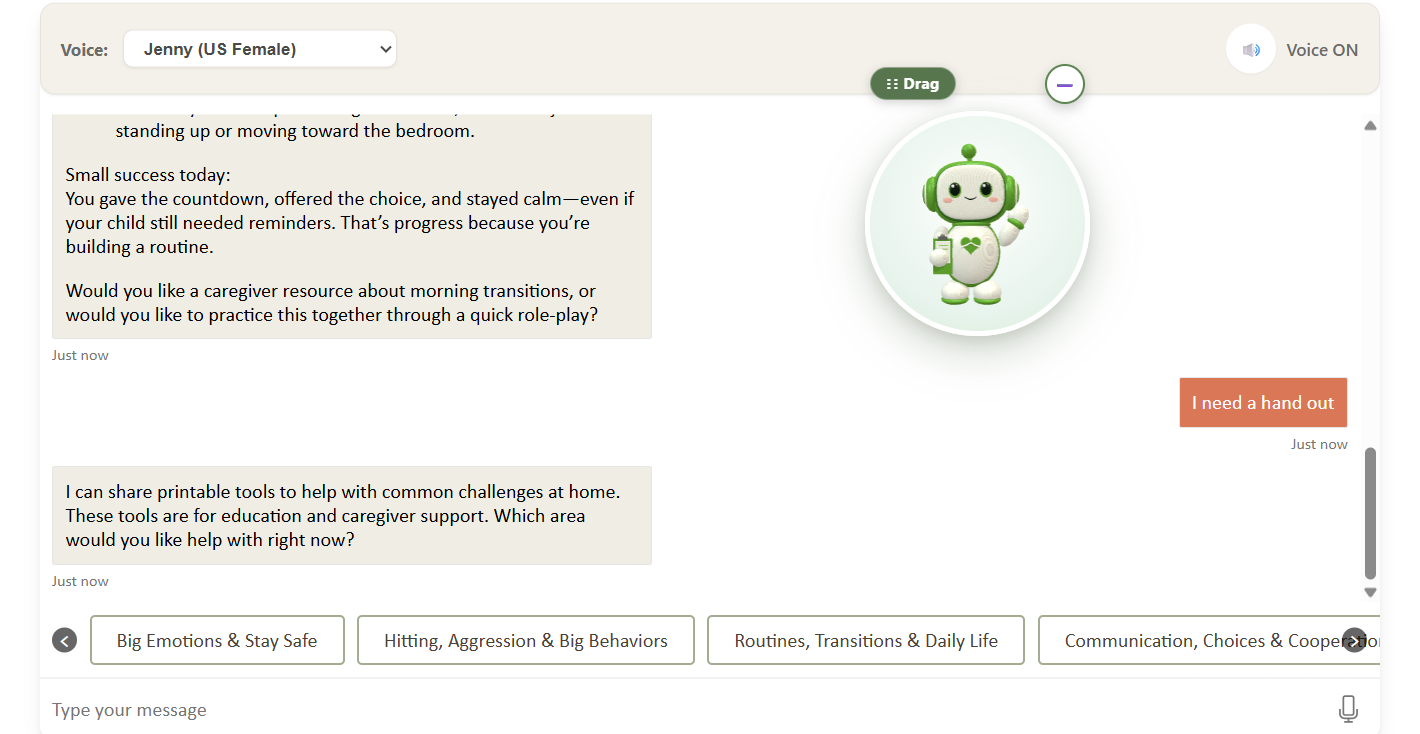
Example family interface. Sample account.
CareBridge Copilot™ proprietary demonstration. © 2026 Sunderlin Behavioral Interventions, Inc. and/or its licensors. No reproduction or redistribution without written permission.
Ask a question. Explore a strategy. Practice a real-life situation. Find your next step.
Ask questions and explore strategies.
Describe what is happening in everyday words, ask follow-up questions, and explore practical strategies for communication, routines, transitions, behavior, independence, and more.
Practice real-life situations.
Use interactive scenarios and role-play to rehearse what you want to say and try another approach before the moment happens.
Access resources at your own pace.
Use printable resources and short educational videos whenever you need them. No appointment needed. Learn when you need it.
Simple, clear pricing for families.
CareBridge Copilot
What's included
- English and Spanish access.
- Up to 200 prompts per month.
- Interactive role-play.
- Voice-to-text on compatible devices.
- Printable educational resources.
- Short educational videos.
- An animated avatar users can reposition or minimize.
- Browser access on compatible phones, tablets, and computers.
Watch the orientation or learn how to save CareBridge to your phone.

Created by a behavior analyst. Designed for everyday learning.
CareBridge Copilot was created by Yrenka Lolli-Sunderlin, MS, BCBA, LBA, CLC, a Board Certified Behavior Analyst, Licensed Behavior Analyst, Certified Life Coach, family educator, and founder of Sunderlin Behavioral Interventions, Inc.
For nearly three decades, Yrenka has supported children, teens, young adults, and the families, educators, and support teams who care about them. She created CareBridge Copilot to make practical learning easier to reach in real-life moments, with plain-language explanations, words you can adapt, role-play practice, printable resources, and clear next steps.
Helpful learning with clearly defined boundaries.
CareBridge Copilot is an educational and learning-support resource. Its safeguards help keep the experience within its intended purpose and make clear when someone should seek qualified professional or emergency assistance.
If someone is in immediate danger or experiencing an emergency, call 911 or your local emergency number. CareBridge Copilot is not an emergency-response service.
Common questions
CareBridge Copilot is for families, educators, and support teams supporting children, teens, and young adults ages 2 to 21 with developmental disabilities, neurodivergence, and other support needs. A separate version is available for educators.
No. A diagnosis is not required to use CareBridge as an educational and learning resource. You can start with what is happening today.
No. CareBridge Copilot is not an ABA service, therapy, or clinical treatment. It is an interactive learning and support platform for families, educators, and support teams. Users can explore strategies for everyday situations involving communication, behavior, routines, transitions, emotional regulation, independence, and other common challenges. CareBridge educational content is informed by established developmental, behavioral, communication, educational, and caregiver-learning principles, but CareBridge does not assess, diagnose, prescribe treatment, develop treatment plans, or replace a qualified professional.
The family subscription is $49.99 per month and includes up to 200 prompts per month, English and Spanish access, interactive role-play, voice-to-text on compatible devices, printable educational resources, short educational videos, and an animated avatar users can reposition or minimize. You can add 100 additional prompts for $20.
There is no public free trial. Selected families or organizations may qualify for a limited evaluation pilot, subject to availability and eligibility. Some evaluation pilots may be offered at no cost. Paid organizational pilots, ongoing access, and customized versions are scoped and priced separately. Contact us to discuss the appropriate option.
Yes. Organizations can arrange access for the families, educators, and support teams they serve and request a customized version that includes organization-approved resources and relevant policies. Visit the organizations page to discuss options.